Title block
tedwojcik
 Plaistow, NH United States
How do I add rider info in title block?
- Read more about Title block
- 4 comments
- Log in or register to post comments

If you've got a question about using BikeCAD Pro, the stand alone application for frame builders, bike shops and fit specialists, post it here.
How do I add rider info in title block?
Just found this nifty site and its free. To print full size layouts of your bike:
1. Export bike as PDF, no scalling, remember where you save it.
2. Go to the link below upload your pdf, after putting in your paper size.
3. It will give you a link to view your new tiled PDF
4. Right click and choose "save as", remember where you save it.
5. Open your new file and print it, make sure you choose no scalling.
6. It does come with a watermark, but your demensions will be VERY accurate.
This will work with any printer.

Brent,
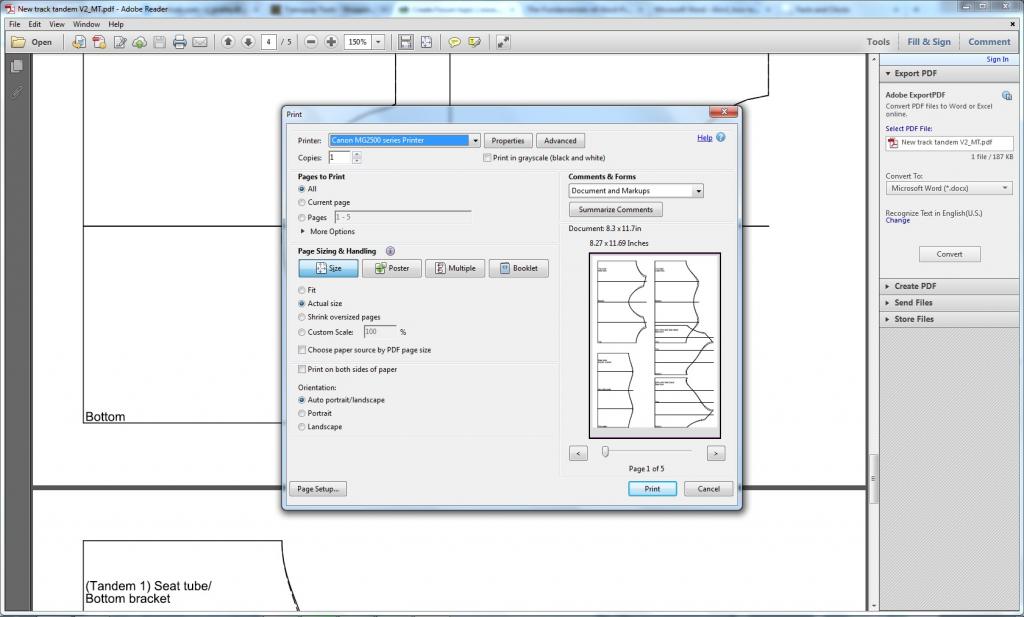
Attempting to print some mitre templates, I have found the bottom of the page's image cut off.
I attempted to attach the file, but pdfs arn't supported, so I've attached a screenshot of the issue
It isn't much, but my version of Adobe Reader XI (11.0.09) is telling me the exported page size is 8.3x11.7", rather than A4's standard 8.27x11.69".
Chris
I've been avoiding 11.5 for the past several months because I can't seem to find the Configuration folder to update my components and templates. I'm using a Mac and downloaded the code signed version in my downloads area. Prior to this version, I had a folder in my "Applications" folder specific to the version of BikeCAD and a sub folder called "Configuration". With 11.5 I can't find that folder. As I'm building a few bikes concurrently, I've had separate instances of BikeCAD running (in different versions) and having to toggle my usual cut information has become somewhat annoying.
Is it possible to just 'paint' the inside of the stays/fork?
Hi Brent,
I'm wondering whether BikeCAD Pro Version 11.5 lets me specify a reinforcement strut like the one shown in the picture.
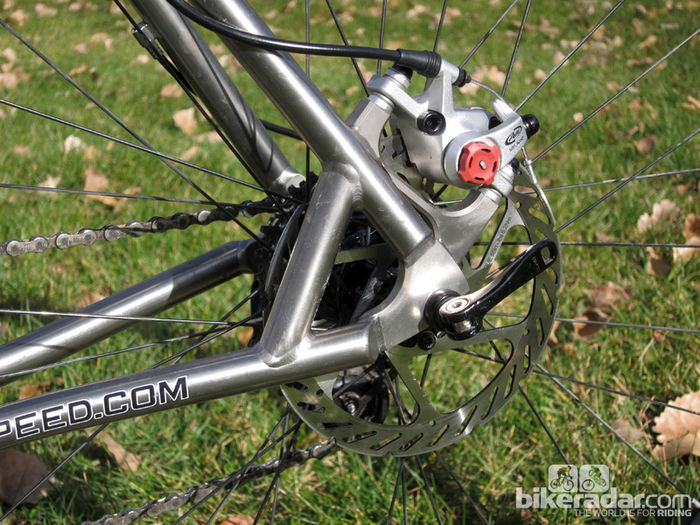
If it does please explain how since I could not find it.
If not please include it into the next version ;-)
Thanks,
Horst

I am having a hard time figuring out how to adjust the default location of a front caliper brake in BCAD. The default location seems to be the lower portion of the headtube. It would be nice to have it mounted to the fork crown.
Does anyone have a suggestion?
Thanks,
Jess Couch

When I view the drawing I see an extra set of tubes and tires plus feet that are displayed horizontally. It would be nice if I could turn them off.
thanks Mike Frye A.K.A. Frye Bikes
I normally run Pro on my Mac but wondering if it's possible to run on a Chromebook?
Cheers
Steven

I was recently asked to demonstrate how one might document a design in BikeCAD using specs from Retül. This is a common question, so I thought I would post my response here on the forum.
The sample Retül session was for a 51mm Specialized Dolce. Before looking too closely at the Retül dimensions supplied, I figured I would model a Specialized Dolce based on the frame geometry posted on the Specialized website.
Below is the BikeCAD model I developed. As you can see, the BikeCAD dimensions match the specs from the Specialized website which I've pasted alongside.
Copyright © 1998 - 2026 The Bicycle Forest Inc. - All rights reserved
Drupal theme by Alaa Haddad